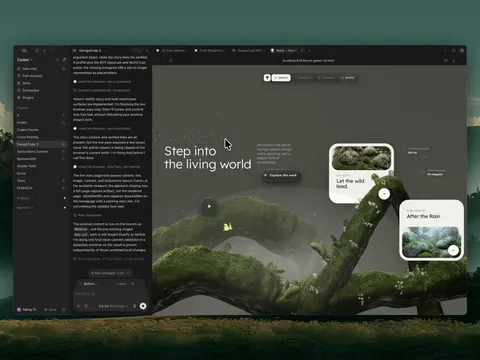
Opus 5 在 Three.js 中创建的着陆页质量让我惊叹不已。只需提示“使用鼠标轨道”就能生成 3D...
观点分析 · 2026/08/28
作者惊叹于 Opus 5 在 Three.js 中创建的落地页质量,仅用“orbit using mouse”等简单提示即可实现 3D 视差效果和粒子跟随指针等生动交互。作者还使用了更多提示,如添加蝴蝶、线框扫描效果和卡片加载扫描效果,并整合了之前制作的着色器按钮和导航栏。整个项目灵感来自一个 Instagram 帖子,代码量不足 1MB,运行两小时完成。作者询问是否应开源。
这篇文章展示了 AI 工具在 3D 网页设计中的惊人能力,通过具体提示词和效果描述,为读者提供了实用参考,并引发了关于开源和 AI 创作边界的讨论。
I’m blown away by the quality of the landing pages that Opus 5 can create in Three.js.
Prompting it with "orbit using mouse" is enough to create a 3D parallax effect. The same goes for "add particles to pointer." It’s like creating a living, breathing world.
More prompts I used:
- Add a butterfly that flies to the branch and flies away when I mouse over it.
- During the intro, first load a wireframe of the branches, similar to the field-scanning effect in Death Stranding.
- Add a scan effect to the card images while they load.
Then I asked it to use the shader buttons and nav bar I made in previous projects.
As explained in my last video, I started with an inspiration and the prompt, “Recreate this in Three.js in a single HTML file. Self-verify until perfect.” Opus 5 ran for two hours. All the code is less than 1 MB.
Inspiration:
https://www.instagram.com/p/DYVXOx6kdmq
Let me know if I should open-source this.
在原站观看视频